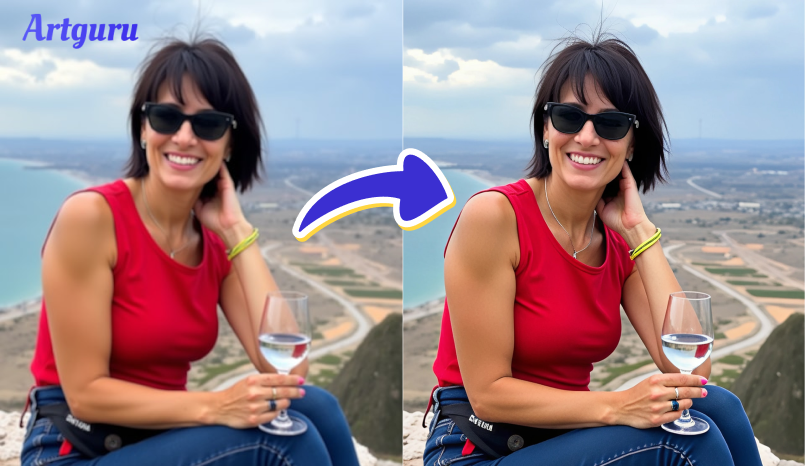
Trying to enhance a blurry or pixelated image, or want to improve photo resolution? It can be extremely frustrating when a cherished photo is too small or blurry to print or share. This happens most often with older images and downloaded images, or when images are cropped.
But don’t worry, as there’s a simple solution. You do not need any editing abilities or expensive software to do this, and in this guide, you will discover how to make your photos clearer and sharper with an AI photo enhancer.
Now let’s get started.
Why Should You Increase a Photo’s Resolution?
There are countless reasons to improve your photo’s resolution, especially if your image looks blurry or pixelated. Often, low-res pictures will suffer quality degradation with printing, cropping, and using them for something important. Increasing your resolution provides a photo with more detail, sharpness, and versatility.
Here are a few key reasons why you might want to do it:
- Print better photos: Higher resolution is a must for printing clear, sharp images, especially in large sizes like posters or photo books.
- Improve image quality: Upscaling can help fix blurry or unclear parts of your photo.
- Crop without losing detail: You can zoom in or cut out parts of the photo without making it look pixelated.
- Use for digital projects: Great for websites, presentations, and online portfolios that need crisp visuals.
- Make old photos look new: Bring life back to scanned or low-quality images from older devices.
By increasing the resolution, you get a cleaner and more professional-looking image, ready for whatever you need it for.
The Best Way to Increase Image Resolution: AI Photo Enhancer
So, what is the best way to increase photo resolution if you don’t have Photoshop skills? The answer is the AI photo enhancer or image upscaler. There are many of these tools available, and they are all easy to use. Most work right in your browser, often no need to sign up or download anything.
For this guide, we will use Artguru Image Upscaler as our example. It is a great tool for beginners, even for those with no knowledge of AI. Here are some of its key features:
- Intuitive Interface: You can improve your image resolution in seconds with just one click.
- AI Upscaling: This AI tool can increase image size to very high resolution, and keep the quality
- Batch Uploads: You can upload and enhance up to 50 photos at once.
- Free and Paid Options: The free plan lets you enhance photos to HD resolution; the paid plan allows up to 8K resolution, faster results, and no watermarks.
Now, let’s see how to increase photo resolution using this AI tool:
Step 1: Upload Your Image
Go to the Artguru Image Upscaler. Click the “Select images” button or drag and drop your image to upload it. It supports common image formats like JPG, WebP, and PNG. You can upload one photo or even a batch of photos at the same time.

Quick Tip: Enhancer vs. Upscaler
You’ll see two options on Artguru, and here’s how to choose the right one:
- Photo Enhancer: Choose this tool if your main goal is to improve overall quality, like clarity and detail. It enhances up to 4K resolution.
- Image Upscaler: Choose this if you want to significantly increase the photo’s dimensions. It can upscale to 8K resolution.
Step 2: AI Enhances the Image
After the upload, simply choose the resolution (2k, 4k or even 8k) you want, and then the AI will automatically improve your image. You don’t need to do anything.

Step 3: Preview and Download
When the image is ready, check the result. If you like it, click Download to save it to your device.

That’s it! Your low-resolution photo is now clearer and ready to use.
Benefits of Using AI Tools Over Manual Editing
Using AI tools like Artguru to increase photo resolution is much easier than editing photos by hand. Manual editing often needs expensive software and photo editing skills. AI tools, on the other hand, do all the hard work for you.
Here are some key benefits:
- Easy to use: No editing experience needed. Just upload your photo and let the AI do the rest.
- Saves time: AI tools work in seconds, while manual editing can take a long time.
- Better results: AI can detect and fix blurry areas, sharpen details, and improve colors without losing quality.
- No expensive software: You don’t need Photoshop or other paid programs.
- Works online: Most tools, like Artguru, work directly in your browser. No download or setup needed.
An AI image quality enhancer is a smart choice for anyone who wants fast and clear photo improvements without the hassle.
Use Cases: Where to Use High-Resolution Photos
High-resolution photos are useful in many situations. Whether you’re printing, sharing online, or using images for work, better quality always makes a difference.
Here are some common ways you can use high-resolution images:
- Photo printing: For posters, photo books, and framed prints, you need high-res images to avoid blur and pixelation.
- Social media: Platforms like Instagram, YouTube, Facebook, and LinkedIn display photos more clearly when they’re high quality.
- E-commerce: Clear product photos help buyers see details and improve trust in your store.
- Presentations and portfolios: A sharp image makes your work look more professional in slideshows and design showcases.
- Restoring old memories: Upscale and clean up old family photos to bring them back to life.
In short, high-resolution photos help your images look clean, sharp, and professional, wherever you use them.
Conclusion
If your photo is fuzzy or simply too small, don’t panic. You can make it clear and sharp by using a free tool like Artguru Image Enhancer. It is simple to use, and zero editing skill is required. Just upload your photo and download the better version. High-resolution photos look better for print, sharing, or as a keepsake.
Give it a shot and see just how much better your photo can be.
WATCH TOP VIDEOS FROM NIGERIAN TRIBUNE TV
- Relationship Hangout: Public vs Private Proposals – Which Truly Wins in Love?
- “No” Is a Complete Sentence: Why You Should Stop Feeling Guilty
- Relationship Hangout: Friendship Talk 2025 – How to Be a Good Friend & Big Questions on Friendship
- Police Overpower Armed Robbers in Ibadan After Fierce Struggle