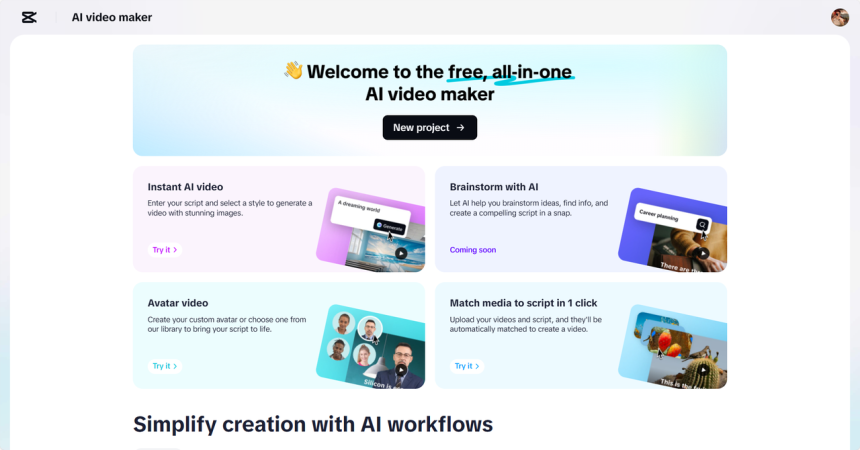
Classrooms worldwide are transforming due to digital learning. Videos are now a requirement for students to consume information. They facilitate the understanding of complicated issues, memorization, and interactions. As a teacher, you likely want to have practical tools that help you create high-quality videos. CapCut Web is an innovative AI-powered education platform. With the platform, your teaching content is easily turned into professional and engaging media.
- The Reason Why Educators Must Have AI-Powered Video Tools
- The AI Tools of CapCut Web to Deliver Curriculum
- Making Tutorials and Instructions Easy with Templates
- Improving Personalized Video Elements to Increase Student Engagement
- Production of Multiple Educational Platform Content
- Craft Engaging Lessons with AI Tools
- Conclusion
The Reason Why Educators Must Have AI-Powered Video Tools
Videos may be produced using conventional tools and may take hours. You encounter challenges such as lengthy editing processes, limited software expertise, and varying video quality. These problems may take away the focus of your instructional intentions. That burden is now made easy by AI video editor tools. CapCut Web offers artificial intelligence-powered editing capabilities. The platform automates work to allow you to concentrate on teaching. It will enable you to create crisp, informative videos without requiring extensive editing skills.
CapCut Web eliminates the need for multiple tools. You do not require external software to edit timelines, subtitles, or voiceovers. This end-to-end system enhances speed and quality.
The AI Tools of CapCut Web to Deliver Curriculum
CapCut Web enables you to design visual lessons. You can start with AI-generated scripts tailored to your specific topic. Type your topic and main ideas to receive a logical lesson quickly.
Then, use avatars to make those lessons real. CapCut Web features over 100 digital avatars. You can even develop a personal avatar by uploading your video. This aids in the visual delivery of concepts, which supports various learning styles.
Create visual stories on tricky topics. Rather than plain text, students should be exposed to structured video stories. This promotes active learning and facilitates easier understanding of the subject.
Making Tutorials and Instructions Easy with Templates
Templates are time-saving and provide consistency. CapCut Web has categorized AI templates for use within an educational context. These are planned to be used in lessons, tutorials, subject reviews, and classroom instruction.
These templates help you create a well-organized format for your videos. Such consistency enhances consistency in the study of lessons across different topics. You format less and work more on content.
Templates also enable quick adaptation. It is also possible to vary the tone, visuals, and pacing according to the level of learning. The tools scale whether you are creating a recap or explaining a new concept.
Improving Personalized Video Elements to Increase Student Engagement
Customized content keeps the students on track. CapCut Web helps you insert captions, background music, and motion graphics. This is more accessible and keeps the learners engaged visually.
It is also possible to incorporate AI-generated avatars and voiceovers in your videos. These factors help form a bond with students. Learners learn better when they receive information directly.
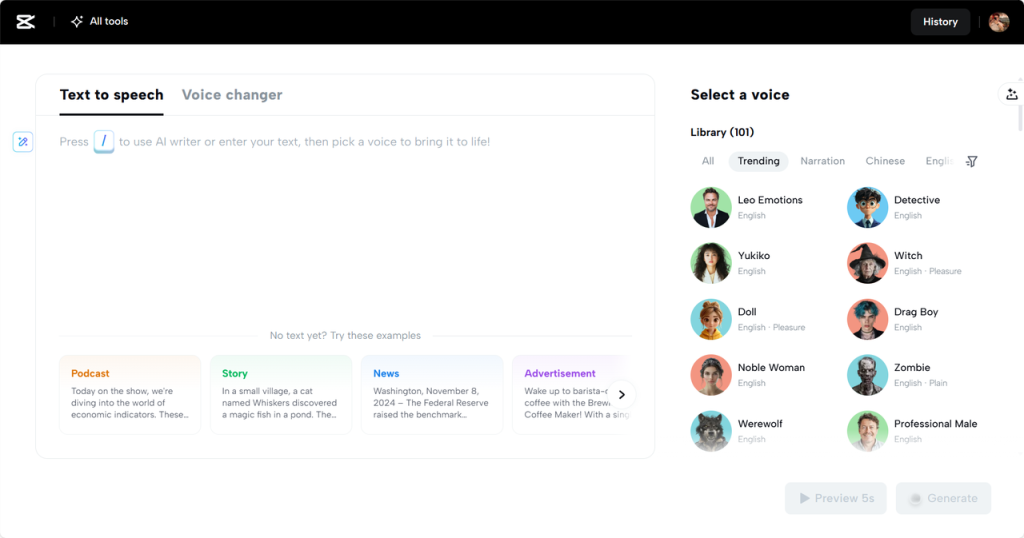
The text to audio free tools are also available in CapCut Web. You convert written notes into understandable oral explanations. This would be perfect for creating audio-visual summaries or narrating table and timeline diagrams.
You can also create interactive experiences by being creative with video tools. Consider inserting question prompts or a gamified series. These increase interaction and encourage participation.
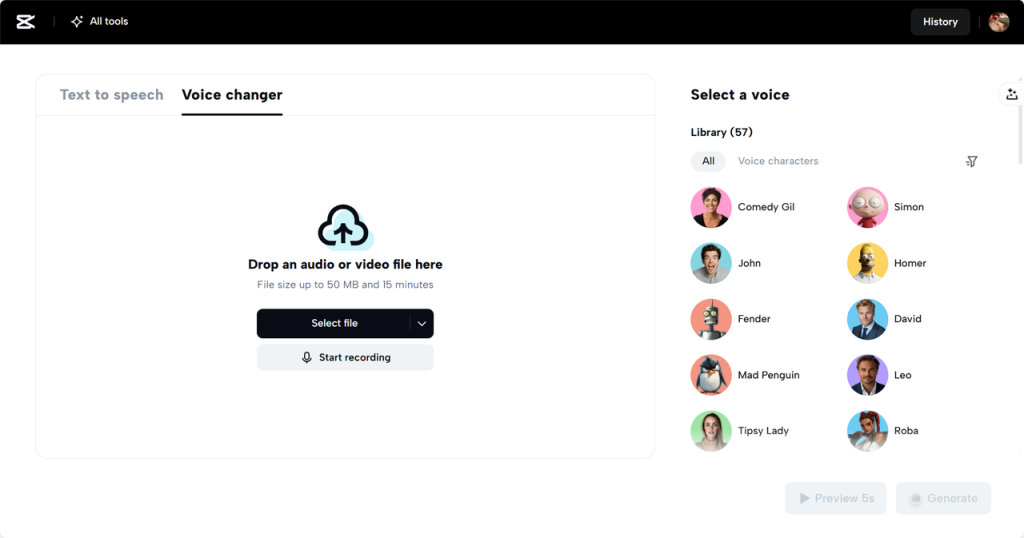
Further along in the editing process, you may need to adjust the tone and/or character voices. CapCut Web features a voice changer that enables pitch and expression adjustments. This would make learning videos more interactive and attractive, particularly to the young generations.
Production of Multiple Educational Platform Content
CapCut Web can be easily customized for other platforms. You can customize content to the T to share on YouTube, Google Classroom, or within a school LMS.
Scale resolution, video duration, and screen structure for every platform. CapCut Web allows you to be compatible without extraordinary effort. Your courses are of high quality on any device.
This versatility facilitates blended learning, flipped classrooms, and distance learning. You meet students on their level, and content works across all screens.
Craft Engaging Lessons with AI Tools
Step 1: Generate Script Begin by heading to the “Script” section. Type in your lesson “Topic” and outline a few “Key points” you plan to teach. CapCut’s AI will instantly generate a complete script based on your input, helping you stay clear and organized. Once you’ve reviewed and tweaked it, click the “Create” button to move forward.

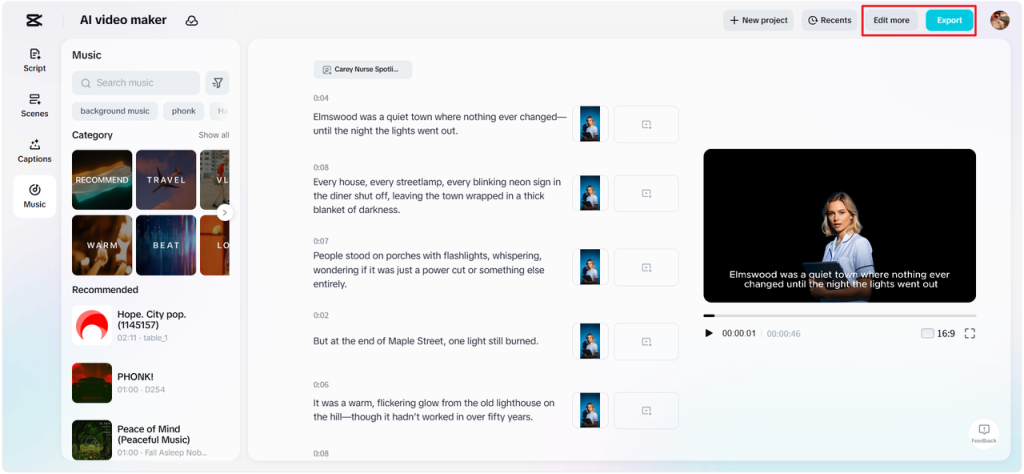
Step 2: Create a video Go to the “Scenes” tab to start syncing your voiceover with the script. Choose from a variety of AI avatars to deliver the content visually, or visit the “Voice” tab if you prefer voice-only narration. After picking a voice, use “Apply for all scenes” to ensure a consistent sound throughout. Then jump into “Captions” to include subtitles with engaging visual styles. To make your educational content more dynamic, add suitable music from the “Music” section.
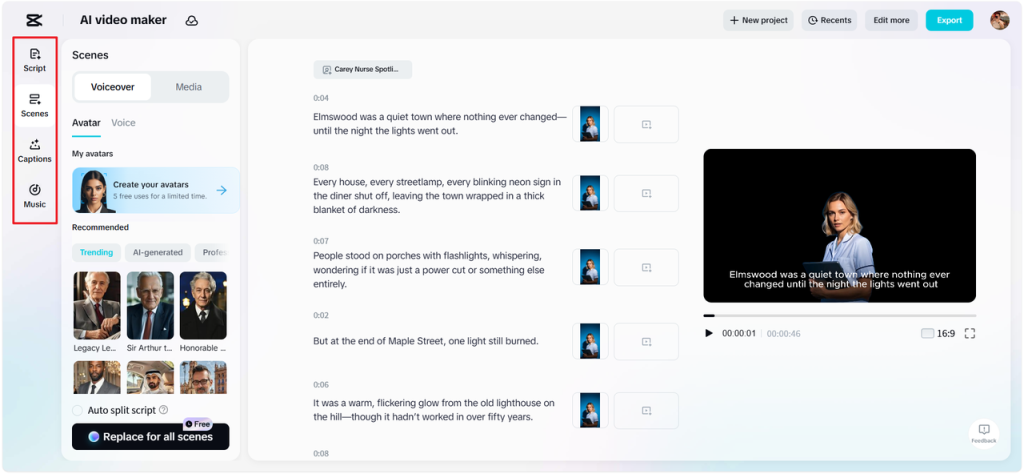
Step 3: Export or Edit more Play back the full teaching video to check clarity and flow. Once it looks right, hit “Export” to save it with settings you choose. If you’d like to refine visuals or add more educational elements, click “Edit more” to access CapCut’s editing features like filters and on-screen graphics.
Conclusion
CapCut Web brings powerful AI tools into your classroom. It reduces editing time, improves video quality, and helps you focus on what matters—teaching.
You can generate educational scripts, deliver content visually, and personalize lessons in minutes. Whether you’re creating daily tutorials or full course modules, the platform adapts to your workflow.
By integrating CapCut Web into your teaching routine, you upgrade your content strategy. Lessons become clearer, more interactive, and aligned with modern learning styles. It’s time to teach smarter and engage students through innovative video content.
WATCH TOP VIDEOS FROM NIGERIAN TRIBUNE TV
- Relationship Hangout: Public vs Private Proposals – Which Truly Wins in Love?
- “No” Is a Complete Sentence: Why You Should Stop Feeling Guilty
- Relationship Hangout: Friendship Talk 2025 – How to Be a Good Friend & Big Questions on Friendship
- Police Overpower Armed Robbers in Ibadan After Fierce Struggle