Many users often ask if it is possible to create a custom homepage in WordPress.
By default, WordPress shows your blog posts on the homepage. However, as a business website, you may want to create a more engaging homepage that helps users find what they need and boost your sales conversion.
In this article, we will show you how to easily create a custom homepage in WordPress. We will show multiple methods, and you can choose the one that’s easier for you.

What is a homepage?
A homepage is a default introductory page or the frontpage of a website. It is the page that appears when someone enters your website’s domain name in their browser’s address bar.
The main purpose of the homepage is to introduce users to your website or business. Ideally, it should provide users with essential information about your business, so they can continue exploring other pages on your site.
By default, WordPress displays your recent blog posts on the homepage. This is not good as it only shows a few of your current articles.
If you run a business website, then the default homepage does not tell users about your business, products or services. It also doesn’t provide users with a way to contact you.
The good news is that WordPress already comes with built-in functionality to create a custom home page.
Selecting a custom page to be used as homepage in WordPress
WordPress allows you to easily use any page on your website as your homepage. You can simply go to Pages » Add New page inside WordPress admin area to create a new page.
Let’s give this page a title ‘Home’ and publish it. You will use this page as your custom homepage.
Don’t worry about layout or design at the moment. We will show you how to design your homepage later in this article.
Now, if you want to run a blog on your site, then you need to create a separate blog page to display your posts.
Once again, go to Pages » Add New page and create a page titled ‘Blog’. Go ahead and publish the blank page.
After creating the pages, you need to visit Settings » Reading page in your WordPress admin. From here select ‘A static page’ option under ‘Your homepage displays’ section.
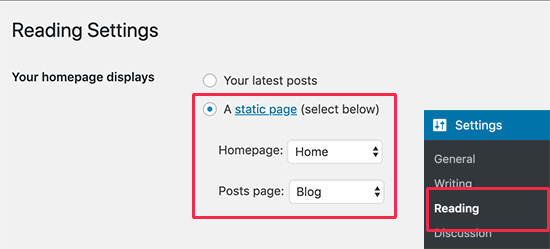
Next, you need to select the homepage and the blog pages you created earlier.
Don’t forget to click on the ‘Save changes’ button to store your settings.
Now that you have set up a page to be used as your custom homepage, let’s start designing the custom home page for your WordPress site.
Method 1. Create a Custom Homepage in WordPress using Gutenberg
WordPress introduced a new block-based eidtor called Gutenberg in December 2018. This new editor allows users to not just write content but create beautiful layouts as well.
It uses blocks for each content element which enables you to organize content blocks to create a page structure that you like.
WordPress includes blocks that can be used for design purposes like cover images, columns, tables, text and media, galleries, and more.
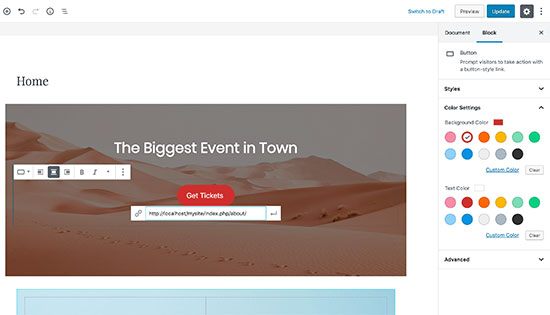
Each block comes with its own settings, which allows you to customize its appearance to meet your design requirements.
You can extend available blocks with Gutenberg block plugins to add more blocks to your arsenal. These plugins allow you to use advanced elements like testimonials, sliders, services, and other common design features.
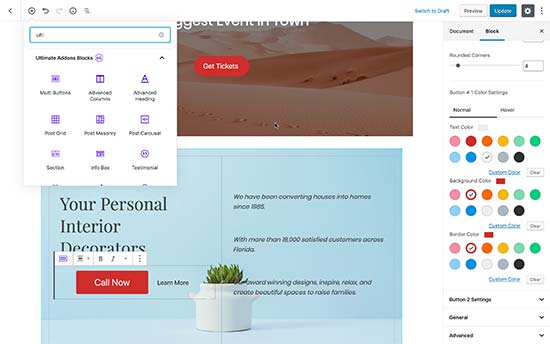
You can also use Gutenberg ready WordPress themes which give you more flexibility to work with blocks.
We recommend using Astra, it comes with Gutenberg website templates that you can install using their Astra Starter Sites plugin.
Once you import a template, you can edit it using the default WordPress editor and create a highly professional looking homepage for your website.
Method 2. Create a Custom Homepage in WordPress using Page Builders
This method is very easy and does not require any coding or design skills. For this method, you will be using a WordPress page builder plugin.
A page builder plugin allows you to easily create custom page layouts by using a simple drag and drop interface.
We recommend using Beaver Builder because it is the most beginner-friendly page builder plugin on the market. It comes with dozens of custom homepage templates that you can install with a single click.
Once installed, you can edit the template using point and click tools. You can replace content and images with your own content, and even extend the template by adding more modules, widgets, and sections.
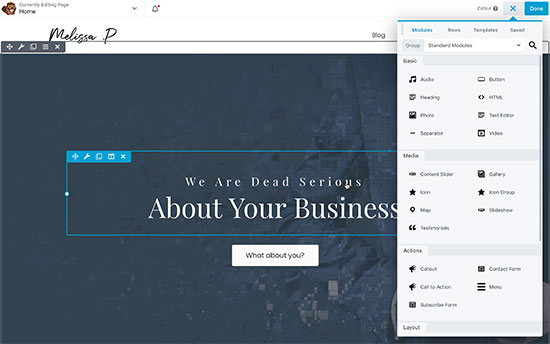
Beaver Builder also gives you access to Beaver Themer, which allows you to make your own custom WordPress theme without writing any code.
For more details, see our guide on how to easily create custom WordPress layouts using Beaver Builder.
As an alternative, you can also try Elementor. It is also an immensely popular WordPress page builder plugin. It also comes with drag and drop templates and an easy to use interface.
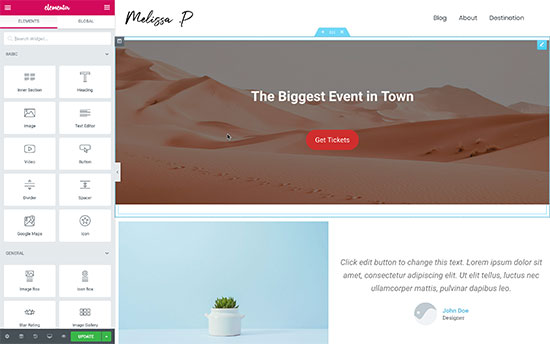
For details, see our tutorial on creating custom page layouts with Elementor.
Method 3. Manually Create a Custom Homepage in WordPress (Coding Required)
This method is not recommended for beginners as it requires coding. You need to be familiar with the WordPress coding practices, PHP, HTML, and CSS to use this method.
Let’s see how this works.
Your WordPress theme is made up of different files. Some of these files are called templates and control the display of certain areas of your website. See our WordPress template hierarchy cheat sheet for more details.
One of these templates is called front-page.php. If your theme has this template, then WordPress will automatically use it to display your custom homepage.
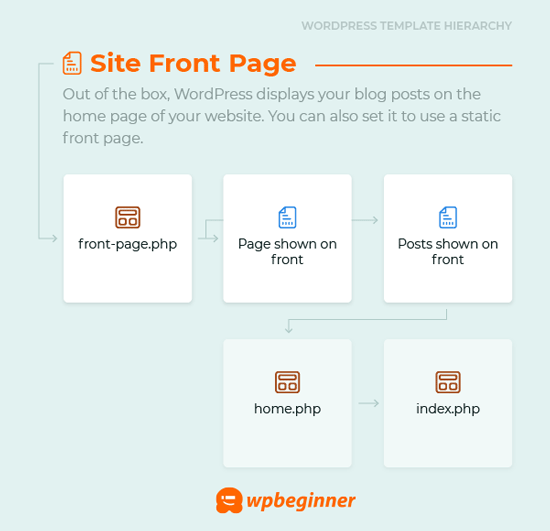
However, if your theme does not have it, then you can create one for yourself/
Simply create a blank file and save it as front-page.php. After that you need to upload it to your current theme’s folder on your WordPress hosting account using FTP.
As soon as you upload this file, WordPress will start using it to display your homepage. However, since this file is completely empty, you will see a blank white page.
To fix this, you can start adding your HTML code to display contents of your custom homepage. An easier approach is to use the existing code and templates in your WordPress theme.
For example, you can use the same header and footer. WordPress makes it super easy to include those templates.
Here is a sample code where we removed the content and sidebars while preserving the header and navigation templates from the theme.
|
1
2
3
4
5
6
7
8
9
10
11
12
13
14
15
16
17
|
<?php /* This page is used to display the static frontpage. */// Fetch theme header templateget_header(); ?> <div id="primary" <?php astra_primary_class(); ?>> <div class="custom-homepage-container"> You custom homepage code goes here </div> </div><!-- #primary -->//Fetch the theme footer template <?php get_footer(); ?> |
Tips on Making an Effective Custom Homepage in WordPress
Your website’s homepage is the most important page on your website. Users look at it to learn more about your business, products, and services.
We recommend keeping your homepage design as simple as possible. On our own websites, we have learned that our users find simpler layouts more helpful.
Try to avoid clutter, but don’t hide important information that your users would want to see on the homepage. You also need to prioritize which content appears first in your layout.
Write down the goals you want to achieve before making a custom homepage for your website. This exercise will help you come up with a clear design goal.
For most businesses and blogs, the number one goal is to convert website visitors into customers. To achieve this, you’ll need OptinMonster.
It is the best WordPress popup plugin and lead generation software. It helps you convert website visitors into subscribers and paying customers.
Next, you would want to track how your custom homepage is performing. For this, you need to install Google Analytics on your website. It helps you see where your users are coming from and what they do on your website.
You would also want to make it easier for your users to contact you. For this, you will need the WPForms plugin which is the best WordPress form plugin on the market.
You can also add a click to call button your website, so people can easily call your business phone.
Lastly, we recommend you to look around at your competitors and other popular sites in your industry/niche. We are not asking you to copy their design, but to learn from their best practices and then apply it on your own homepage layout.
We hope this article helped you easily create a custom homepage in WordPress. You may also want to see our proven tips to increase your blog traffic.
If you liked this article, then please subscribe to our YouTube Channel for WordPress video tutorials. You can also find us on Twitter and Facebook.
WATCH TOP VIDEOS FROM NIGERIAN TRIBUNE TV
- Relationship Hangout: Public vs Private Proposals – Which Truly Wins in Love?
- “No” Is a Complete Sentence: Why You Should Stop Feeling Guilty
- Relationship Hangout: Friendship Talk 2025 – How to Be a Good Friend & Big Questions on Friendship
- Police Overpower Armed Robbers in Ibadan After Fierce Struggle