Tribune OnlineTribune OnlineTribune Online
  • Home
  • News
  • Columns
  • Editorial
  • VIDEOS
  • Entertainment
  • Politics
  • Health
  • Opinions
  • SPORTING TRIBUNE
Reading: How to save WhatsApp status using Xender without data
Share
Notification Show More
Font ResizerAa
Tribune OnlineTribune Online
Font ResizerAa
  • Home
  • News
  • Columns
  • Editorial
  • VIDEOS
  • Entertainment
  • Politics
  • Health
  • Opinions
  • SPORTING TRIBUNE
  • About Us
  • Contact us
  • Disclaimer
  • Privacy Policy
  • Advertise
Have an existing account? Sign In
Follow US
© 2026 African Newspapers of Nigeria Plc. All Rights Reserved. | Disclaimer | Privacy Policy | Editorial Policy | Corrections Policy | Terms & Conditions
Home » How to save WhatsApp status using Xender without data
Technology

How to save WhatsApp status using Xender without data

Ismaila Biliaminu Manne
October 5, 2025
Share
WhatsApp Logo
Add as a preferred source

As the Nigerian government announced a 50 per cent hike in telecommunication tariffs, it sparked concern among millions of citizens who rely on affordable mobile services for communication, business, and everyday life.  

Contents
  • How Xender Makes It Easy
    • Step 1: Open the Xender App
    • Step 2: Tap on the Social Icon
    • Step 4: Choose and Download
    • Step 5: Enjoy and Share

Ranging from calls, data subscription, to Short Message Service (SMS), the cost of staying connected has increased, and it takes its toll on the average Nigerian. Also, students and workers are not left alone; they “rely on mobile data to access essential resources, including research materials, online learning platforms, assignments and communication tools,” according to University World News..

Meanwhile, despite the tariff hike, many internet users continue to subscribe and post various types of content. For a WhatsApp user, you may spot a hilarious meme or jaw-dropping video clips on your friend’s WhatsApp status and wish to have it. And when you request it, you’ll likely receive a response of “I don’t have data.” 

With Xender, the same app you’ve probably been using for quick file transfers, has a built-in feature that lets you download WhatsApp statuses straight to your phone, without using your mobile data. Most people don’t realize this, hence, they leverage a third-party “status saver” app. 

In this article, Tribune Online proffers a step-by-step guide on how to save WhatsApp status using Xender in just a few taps.

How Xender Makes It Easy

Unlike other apps that flood you with ads or ask for shady permissions, Xender already does the heavy lifting. Beyond file sharing, it has a “Social” tab that pulls WhatsApp statuses directly into the app. No digging into hidden folders. No wasting of data, whether you are using Android or IOS (iPhone), just open, click, and save.

Step 1: Open the Xender App

First, launch the Xender app on your phone if you don’t have it. Ensure you’re running the updated version, because older versions may not have the “Social” feature.

Step 2: Tap on the Social Icon
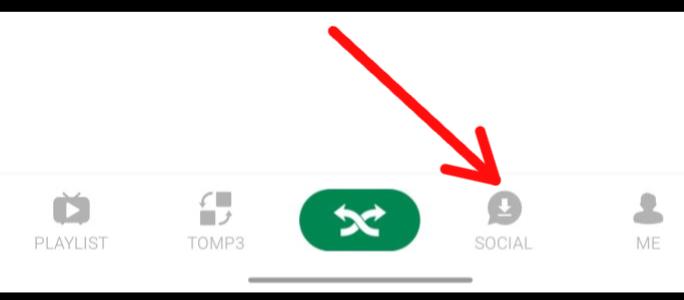
At the bottom of the home screen, you’ll see several icons. Look for the one labeled “Social.” That’s your gateway to all the WhatsApp statuses from your contacts.

Step 3: Select WhatsApp Statuses
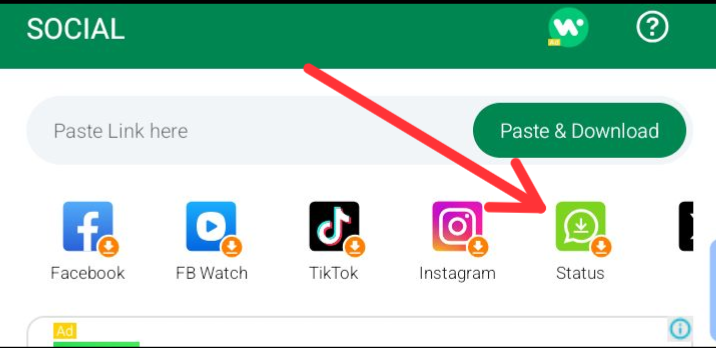
Once inside the “Social” tab, tap Statuses. Here, Xender automatically displays every WhatsApp status you’ve viewed: photos, videos, quotes, everything. With no extra setup needed.

Step 4: Choose and Download

Scroll through the statuses until you find the one you want to save. Just hit the Download button, and boom, the status gets stored directly in your phone’s gallery (storage). No internet data used, no third-party apps.

Step 5: Enjoy and Share

Once downloaded, you can keep it forever, share it with friends through Xender or WhatsApp, or simply enjoy it offline. Remember, WhatsApp automatically deletes statuses after 24 hours, but with Xender, you’re in control.

Utilizing these steps by just open Xender, tap “Social,” select the status, and download it. Next time, when a friend posts something you can’t stop laughing at, you’ll know exactly how to keep it for yourself.


WATCH TOP VIDEOS FROM NIGERIAN TRIBUNE TV

  • Back to School, Back to Business A Fresh Start

  • Relationship Hangout: Public vs Private Proposals – Which Truly Wins in Love?

  • “No” Is a Complete Sentence: Why You Should Stop Feeling Guilty

  • Relationship Hangout: Friendship Talk 2025 – How to Be a Good Friend & Big Questions on Friendship

  • Police Overpower Armed Robbers in Ibadan After Fierce Struggle


    Get real-time news updates from Tribune Online! Follow us on WhatsApp for breaking news, exclusive stories and interviews, and much more.
    Join our WhatsApp Channel now


TAGGED:WhatsApp
Previous Article Lagos govt shuts chemical factories Lagos govt shuts chemical factories over safety breaches
Next Article NDLEA suspects in Kaduna NDLEA’s operational successes National Drug Law Enforcement Agency on substance abuse National Drug Law Enforcement Agency (NDLEA) who have arrested 27-year-old Umar Adamu Umar of Fagge LGA, Kano State, with 9 kilograms of Cannabis Sativa (Colorado) worth ₦10 million, seized in 19 parcels, Logo of NDLEA ntercepted consignments of cocaine and tramadol 225mg concealed in 71 vehicle side mirrors at Lagos Airport NDLEA nabs suspected drug baron, five others over cocaine concealed in export goods

Most Read

  • Opay to customers: How to check eligibility for FG’s N50,000 cash support
    Opay to customers: How to check eligibility for FG’s N50,000 cash support
  • Baze University acquires two training aircraft for Aviation School in Abuja
    Baze University acquires two training aircraft for Aviation School in Abuja
  • 2027: TY Danjuma endorses Tinubu, donates N250m to chapel
    2027: TY Danjuma endorses Tinubu, donates N250m to chapel
  • FCTA eyes $1.5bn green investment to overhaul Abuja's energy and transport sectors
    FCTA eyes $1.5bn green investment to overhaul Abuja's energy and transport sectors
  • Ex-AfDB President, Adesina named Global Insurance Ambassador
    Ex-AfDB President, Adesina named Global Insurance Ambassador
  • Seven Supreme Court justices still under US travel ban —Retiring justice
    Seven Supreme Court justices still under US travel ban —Retiring justice
  • I applied for medicine but my JAMB wasn’t good enough, so I ended up in chemistry —Al-amin Biliaminu, LAUTECH’s graduate with 4.96 CGPA
    I applied for medicine but my JAMB wasn’t good enough, so I ended up in chemistry —Al-amin Biliaminu, LAUTECH’s graduate with 4.96 CGPA
  • How MTN users can access FG’s N50,000 cash support
    How MTN users can access FG’s N50,000 cash support
  • 2027: They will do burial in your house if you rig my election, Remi Oseni warns
    2027: They will do burial in your house if you rig my election, Remi Oseni warns
  • Retirement of aggrieved directors follows FG’s directive, NIMR insists
    Retirement of aggrieved directors follows FG’s directive, NIMR insists

Frontpage Today

Subscribe to e-Paper

E-Vending, e paper, pdf, e-paper, Tribune
QUICK LINKS

About Us
Advertise with Us
Contact Us
Privacy Policy
Disclaimer
Editorial Policy
Corrections Policy
Terms & Conditions
COLUMNS

Aplomb
Ask The Doctor
Autoclinic With The Mechanic
Awo's Thought
Empowered For Life
Festus Adebayo's Flickers
Gibbers
Intimacy
Language & Style
Leadership & Management
Lynx Eye
Monday Lines
Mum & Child
Natural Health
Notes from Atlanta with Farooq Kperogi
On The Lord's Day
Your Life Counts

ENTERTAINMENT

Entertainment

RELIGION

Tribune Church
Church News
Muslim Sermon
Eye of Islam
Islamic News

EDITORIAL

Editorial
Opinion
Letters
News Extra

BUSINESS

Capital Market
Money Market

REGIONS

Niger Delta
Arewa
MORE

Sexuality & Health
Special Report
Sports
Tourism
Travelpulse & MICE
Weekend Lagos
Book Review
Education
Event Digest
Crime & Court
Ecoscope
Energy
Maritime
Aviation
Brands & Marketing
Agriculture
Info Tech
Labour
Leadership & Management
Arts & Culture
Arts & Reviews
Politics
Health News
© 2026 African Newspapers of Nigeria Plc. All Rights Reserved. | Disclaimer | Privacy Policy | Editorial Policy | Corrections Policy | Terms & Conditions

Add Tribune Online to your Homescreen!

Add
Welcome Back!

Sign in to your account

Username or Email Address
Password

Lost your password?