Introduction
The need to convert PDF files cannot be overstated in today’s modern workplace. From sharing documents to archiving information, the ability to convert PDFs is important. Having the right software streamlines this process. It enhances productivity and efficiency for individuals and organizations alike.
- Introduction
- Part 1. What To Look For in a Dedicated PDF Converter
- Should I Use Offline or Online PDF Converters?
- What Is an Ideal File Format To Convert PDFs?
- Can PDF Tools Handle Batch Conversion?
- Part 2. Best Tool To Convert PDFs – Wondershare PDFelement
- Part 3. How To Convert PDF Files Using PDFelement
- Bonus. Another Way To Convert PDF Files In-App
- Conclusion
The article discusses all you need to know about PDF conversion. It empowers you with the knowledge to handle digital documents with ease. Say goodbye to cumbersome processes and hello to a simplified conversion process. Explore how to convert PDFs with efficiency and unlock a world of possibilities. Read on to learn more.
Image Name: woman-working-with-pdfs-on-laptop.jpg
Image Alt: woman using laptop working
Part 1. What To Look For in a Dedicated PDF Converter
Choosing the right PDF converter is essential to streamline your document management tasks. When selecting a PDF converter, consider the features to ensure it meets your needs. Here’s what to look for when evaluating dedicated PDF converters:
- Comprehensive functionality. A robust PDF converter should offer more than just basic conversion capabilities. Tools like Wondershare PDFelement allow you to create, edit, annotate, and convert PDFs.
- Collaboration tools. Choose a PDF converter with collaboration features. It enables many users to work on documents, comment, and provide real-time feedback.
- Search functionality. Ensure the converter allows for easy searching within PDF documents.
- Data extraction. The ability to copy from PDFs is a plus for other purposes.
- Content manipulation. Look for tools that enable you to add blank pages or rearrange layouts. It allows you to customize documents according to your needs.
- Form handling. A tool that can accept payments via interactive forms within PDFs enhances efficiency.
- E-Signature support. Ensure the converter offers e-signature functionality. It allows you to sign documents or create legally binding e-signature fields.
- Redaction tools. Look for features that let you blackout or redact confidential data on documents to protect privacy.
- OCR support. Opt for a tool with Optical Character Recognition (OCR) to edit text within scanned PDFs.

Should I Use Offline or Online PDF Converters?
When deciding between offline and online PDF converters, consider your preferences. While online converters offer convenience, offline tools like PDFelement provide security and functionality. With offline converters, your documents remain on your device. PDFelement reduces the risk of data breaches or unauthorized access to your PDFs. Additionally, offline tools offer more advanced features and customization options. They ensure a seamless and tailored conversion experience.
What Is an Ideal File Format To Convert PDFs?
The ideal file format for converting PDFs depends on the intended use of the converted document. Formats like Word (DOCX) or rich text format (RTF) are ideal for editable text documents. These formats preserve the original PDF’s text, formatting, and layout. Excel (XLSX) is the preferred format for tabular data or spreadsheets. It retains the structure and formulas of the original PDF.
When converting PDFs to share or display images, formats like JPEG or PNG are suitable. They maintain the visual integrity of the document. It’s essential to consider the specific requirements of your project or workflow when selecting the file format for conversion.
Can PDF Tools Handle Batch Conversion?
Many PDF tools, including PDFelement, offer batch conversion capabilities. It allows you to convert many files simultaneously, saving time and effort. Whether converting a few files or an entire folder of PDFs, batch conversion ensures a seamless workflow. It’s an important feature for busy professionals and organizations.
Part 2. Best Tool To Convert PDFs – Wondershare PDFelement
PDFelement is the ultimate go-to tool for seamless PDF conversion and management. The feature-rich software combines powerful functionality with a user-friendly design. It’s a popular choice for many users and organizations alike. Here’s why PDFelement stands out:

- Versatile conversion
PDFelement allows you to convert PDFs to various formats. It can convert your PDFs to Word, Excel, PowerPoint, and Text, preserving formatting and layout.
- Image conversion
Need images instead? PDFelement has you covered. It offers the ability to convert PDFs to image formats such as JPEG, PNG, and more.
- Diverse format support
Whether it’s HTML, EPUB, RTF, or other formats, PDFelement ensures compatibility with a wide range of file types.
- Two-way conversion
Not only can you convert PDFs to other formats, but you can also convert files to PDF. The tool provides flexibility in document creation.
- Efficient batch conversion
With PDFelement, batch conversion is a breeze. It allows you to convert many PDF files with a few clicks.
- Enhanced security
Unlike online converters, PDFelement offers enhanced security features. The tool ensures your documents stay confidential.
- Free version
PDFelement offers a free version. It has all the essential features you need for basic PDF management needs.
- Cross-platform compatibility
Whether you’re using Windows, Mac, or mobile devices, PDFelement provides seamless performance across all platforms.
Pricing
As for pricing, PDFelement offers flexible plans to suit your needs:
- Quarterly Plan: $29.99. This plan is ideal for short-term projects. It’s best for users who need PDF editing capabilities for a short period. It offers three months of access to all the features of PDFelement.
- Yearly Plan: $79.99. The annual plan suits individuals or businesses with ongoing PDF editing needs. It provides an entire year of access to PDFelement’s full suite of features. The plan offers cost savings compared to the quarterly plan.
- Perpetual Plan: $129.99. The perpetual plan is recommended for long-term users seeking a one-time purchase option. It offers lifetime access to PDFelement’s features without the need for recurring payments. The plan provides a convenient solution for those who prefer a one-time investment in PDF editing software.
Part 3. How To Convert PDF Files Using PDFelement
With these simple steps, you can convert PDF files to various formats using PDFelement. Learning the operational steps can simplify your document management tasks. Let’s dive into how to convert PDF files effortlessly using PDFelement:
Step 1: Download, install, and launch
Download and install PDFelement on your preferred device. Once done, launch the tool. Next, login or register for a Wondershare account if you don’t have one yet. Alternatively, your Google, Facebook, Microsoft, or X (formerly Twitter) account can be used.
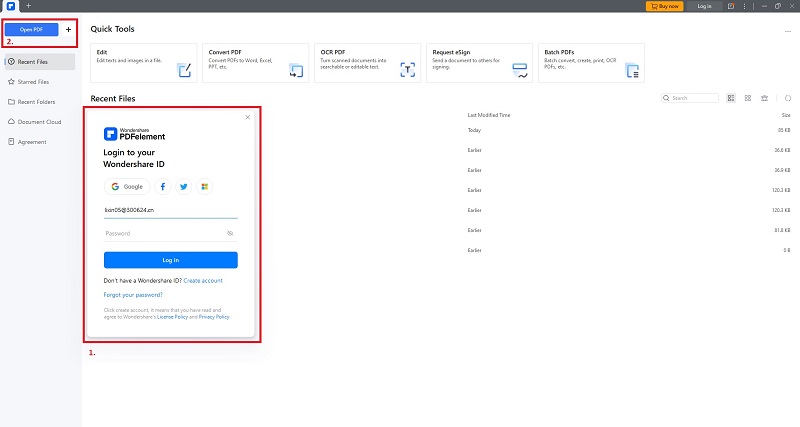
Step 2: Open PDF File
Open the PDF file you want to convert. Click on the Open File button within PDFelement’s interface. Or, drag and drop the PDF file directly into the software. You can also click on Convert PDF to save time. Choose the output format and output folder to save the converted PDF.
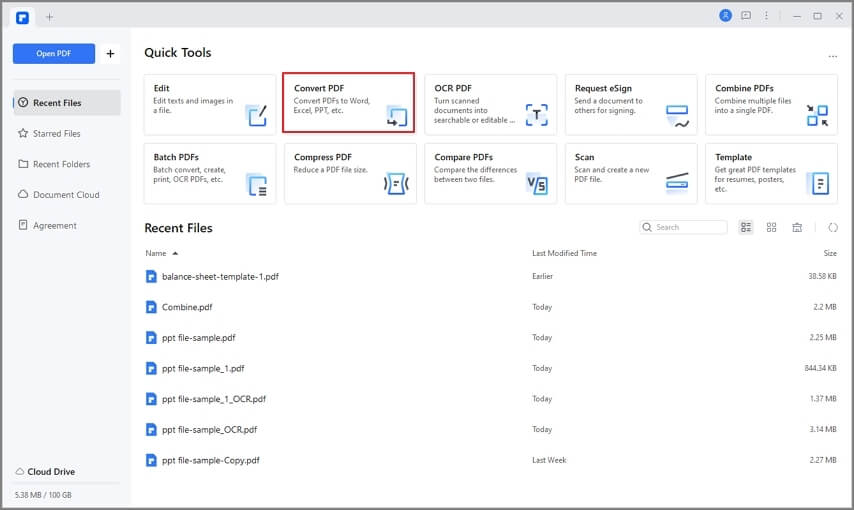
Step 3: Batch Convert PDF to other formats
PDFelement offers a variety of conversion options, including Word, Excel, PowerPoint, Text, and more. To convert many PDFs simultaneously, click on Batch PDFs instead. Choose the output format and output folder once more to finish the process.

Bonus. Another Way To Convert PDF Files In-App
Here’s an alternative way to convert PDFs on PDFelement. If you want a more in-depth process for converting PDFs, follow these steps:
Step 1: After launching PDFelement on your computer, open the PDF file for conversion. From the main window, click Convert and choose your preferred file format.
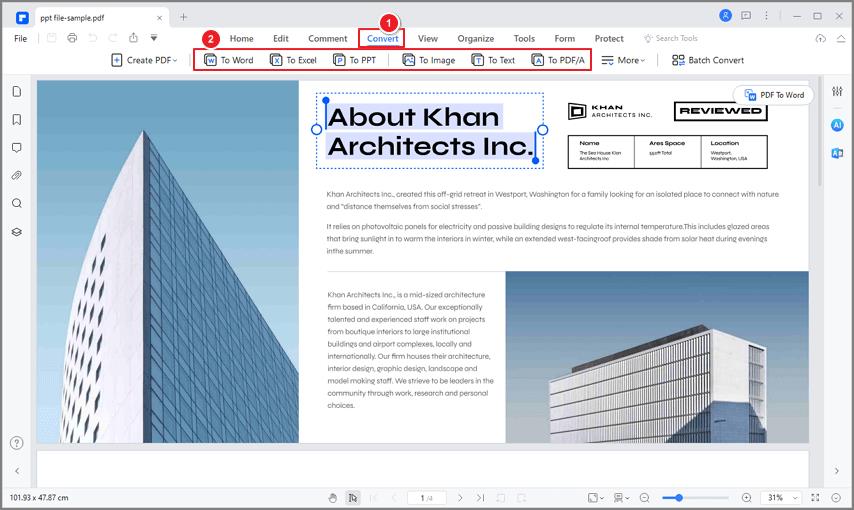
Step 2: You can also use the floating button to convert PDFs with a click. When done, choose the output folder to save the converted files.
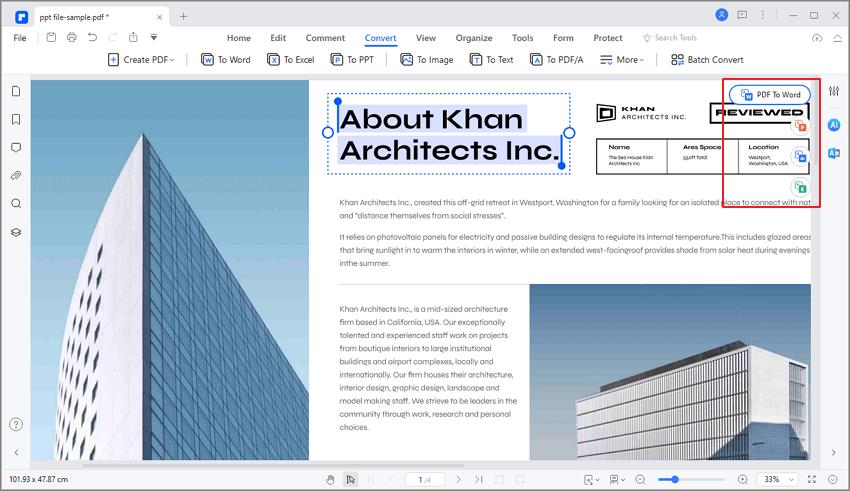
Conclusion
Choosing the right tool to convert PDF files is crucial for efficient document management. Look for comprehensive functionality, collaboration features, and security measures. For the ultimate solution, consider PDFelement. The software ticks all the boxes, offering versatile conversion options and enhanced security. What’s more, it even has cross-platform compatibility so that you can use it on your preferred device.
With PDFelement, converting PDF files becomes effortless. The tool empowers you to handle digital documents with ease. Feel free to test the convenience and power of PDFelement for all your PDF conversion needs.
WATCH TOP VIDEOS FROM NIGERIAN TRIBUNE TV
- Relationship Hangout: Public vs Private Proposals – Which Truly Wins in Love?
- “No” Is a Complete Sentence: Why You Should Stop Feeling Guilty
- Relationship Hangout: Friendship Talk 2025 – How to Be a Good Friend & Big Questions on Friendship
- Police Overpower Armed Robbers in Ibadan After Fierce Struggle