Imagine scoring 290 in your UTME, beating the cut-off mark for your dream course, and celebrating with your family, only to find out later that your name was completely skipped on the admission list.
- Why missing O’Levels can disqualify you
- What the JAMB CAPS O’level screen looks like
- Simple steps to check your uploaded WAEC result on JAMB CAPS
- Log in to Your eFacility Profile
- Locate the admission status button
- Access your central CAPS dashboard
- Verify the O’level Screen
- What should you do if it’s Blank or showing “AR”?
- Frequently Asked Questions
Or even worse, someone with a lower score gets picked over you. It sounds like a bad dream, doesn’t it? And the issue could be a completely blank O’level section on the JAMB Central Admissions Processing System (CAPS).
According to the official JAMB Admission Processing Manual, any candidate missing their O’level data during the selection window faces automatic disqualification. The system is entirely automated now, meaning if your grades aren’t showing on your portal, the admission software simply pretends you don’t exist.
How can you ensure this doesn’t happen to you?
Thing To Note:
- The “Awaiting Result” (AR) Trap: If your profile still says “AR” or shows empty spaces where your grades should be, you need to visit an accredited JAMB CBT centre immediately to fix it.
- Be Honest: Don’t even think about uploading a doctored, fake, or altered WAEC statement. The current JAMB CAPS links up directly with the live WAEC database to verify results in real time.
- Keep Your Scratch Card: Keep the original WAEC scratch card or token you used during the upload process. If the system experiences a glitch or a network hiccup down the line, you’ll need it to sort things out.
Why missing O’Levels can disqualify you
A lot of candidates assume that because they typed in their WAEC grades during their initial UTME registration, everything is automatically sorted out. That’s a big misconception. Sometimes, data gets stuck in transit, or the synchronisation between portals fails.
To give you an idea of how serious this is, a veteran admissions officer from Obafemi Awolowo University (OAU) shed some light on the issue:
“Every single year, we see brilliant minds with fantastic UTME scores lose out on competitive merit slots. The university doesn’t manually check your physical papers during the initial selection phase; we rely entirely on what JAMB CAPS displays. If your WAEC results are missing when we pull the data, the system flags your profile as incomplete. We have no choice but to pass the slot to the next qualified candidate on the list.”
What the JAMB CAPS O’level screen looks like
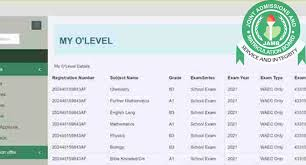
Before we look into the steps, it helps to know exactly what you are looking for. When you get to the right page, you should see your subjects properly mapped out alongside your corresponding grades.
Source: Myeduvantage
Simple steps to check your uploaded WAEC result on JAMB CAPS
Checking your status doesn’t take more than five minutes, but you need to follow the right steps.
Note that: If you’re using a smartphone, open your mobile browser settings (usually the three vertical dots in Chrome) and check the “Desktop Site” box. This is because the standard mobile view often cuts off the side navigation menu where the CAPS link is located.
Log in to Your eFacility Profile
Log in to the official JAMB eFacility portal link. Enter your registered email address and password to open up your candidate dashboard.
Locate the admission status button
Scroll down your main dashboard and click on the purple “Check Admission Status” tab. Select your correct examination year from the dropdown menu before moving forward.
Access your central CAPS dashboard
Click on the green “Access my CAPS” button. This takes you out of the basic profile page and directly into the central processing system, where admissions are managed.
Verify the O’level Screen
Look at the left-hand menu bar and select “My O’level”. Give the page a second to load your subject rows. If you see your grades displayed neatly next to your subjects, you are good to go!
What should you do if it’s Blank or showing “AR”?
If you open the tab and find “Awaiting Result” then you need to act fast.
Grab your WAEC result printout, along with your original scratch card or token details, and walk into any accredited JAMB CBT Centre nearby. Do not try to save costs by using a regular cyber café down the street.
Standard cyber cafés don’t have the secure access keys needed to push O’level data directly into JAMB’s active server database.
ALSO READ: How to check your WAEC GCE result using your phone fast
Frequently Asked Questions
How much does it cost to upload O’level results at a CBT centre?
The official, regulated price set by JAMB for uploading your O’level results at any accredited CBT centre across the country is ₦500 (Five Hundred Naira). If any vendor tries to charge you thousands of Naira for this basic service, you are probably being ripped off.
How long does it take for WAEC results to reflect on JAMB CAPS after an upload?
While the upload updates instantly within the central JAMB backend database, it usually takes between 24 to 72 hours for the cached information to show up visually on your personal eFacility dashboard screen. Give it a few days before checking back.
Can I check my uploaded WAEC result on my phone?
Yes, absolutely! You can use any smartphone to check your status. Just remember that the CAPS page is designed for computer monitors. You must switch your mobile browser settings to “Desktop Site” mode, or else the side menu tabs will remain completely invisible to you.
WATCH TOP VIDEOS FROM NIGERIAN TRIBUNE TV
- Relationship Hangout: Public vs Private Proposals – Which Truly Wins in Love?
- “No” Is a Complete Sentence: Why You Should Stop Feeling Guilty
- Relationship Hangout: Friendship Talk 2025 – How to Be a Good Friend & Big Questions on Friendship
- Police Overpower Armed Robbers in Ibadan After Fierce Struggle