AI is still revolutionizing video advertising, providing faster content creation and enhanced creative options. But creative Control is still important as structured visuals help build brand identity and audience interaction. Pippit offers an AI-powered platform that includes structured workflows for creating promotional videos that focus on the story. It is designed to be accessible, with the ability to edit, add visual cues and references, and provide timestamp guidance and advanced prompting, which ensures consistency and allows for polished ad production for multiple campaigns.
- Why Creative Control Matters in AI Advertising
- Core Features That Improve AI Ad Generation in Pippit
- Steps to Generate AI Ads with Greater Creative Control in Seedance 2.5
- Using Timestamp Prompts to Shape Better AI Advertisements
- Practical Ways to Improve AI Ad Quality
- Enhancing AI Advertisements with Reference Inputs
- Refining AI Advertisements After Generation
- Conclusion
Why Creative Control Matters in AI Advertising
Creative Control ensures that all ads are not random images, but are brand-suitable. There is a balance in automation that can help you with efficiency and still have meaningful storytelling and familiar campaign styles. This message is repeated throughout all the scenes and serves to create trust from the audience, and helps to reinforce the product over time. Structured ads contain logical starts, interesting middles and memorable finishes, but with no confusing transitions. Production can also be expedited since there are fewer unnecessary revisions and a more efficient workflow, thanks to organized creative direction. This is where Pippit’s structured approach to creating promotional stories can help creators create more accurate, more visually consistent promotions.
Core Features That Improve AI Ad Generation in Pippit
Pippit has a variety of features that help create professional ads quickly and easily without compromising creativity. Seedance 2.5 allows for continuous videos up to thirty seconds long, enabling connected storytelling to be achieved without breaking down ideas into several clips. Time-stamp encourages precise camera movement, shot timing and action directions for key scenes. Just the cinematic camera move will create a professional-looking promo with realistic camera moves and natural visual flow. High fidelity rendering gives high quality textures, lighting and product presentation for commercial campaigns. Multilingual prompting can be helpful for localized advertising, allowing advertisers to craft campaigns tailored to various regions while maintaining the visual impact and messaging.

Steps to Generate AI Ads with Greater Creative Control in Seedance 2.5
Step 1: Plan your AI ad in the “Video generator”
- Sign up for Pippit to access the home page.
- Click “Video” on the main dashboard or access “Video generator” in the left menu.
- Enter a text prompt and clearly describe your ad concept, visual style, tone, camera angles, and marketing message.

Step 2: Produce your AI advertisement
- Click “+” and upload your image, video, file, or link that you want to use for the ad.
- You can also click “Upload a reference video” and choose “Upload” to add a sample ad, so the AI follows its style.
- Choose “Dreamina Seedance 2.5” model from the list.
- Choose the video length, language, and aspect ratio.
- Click “Generate,” and Pippit starts creating an AI ad based on your prompt.

Step 3: Polish and export your ad
- Select your video, and press the Play button to preview the result.
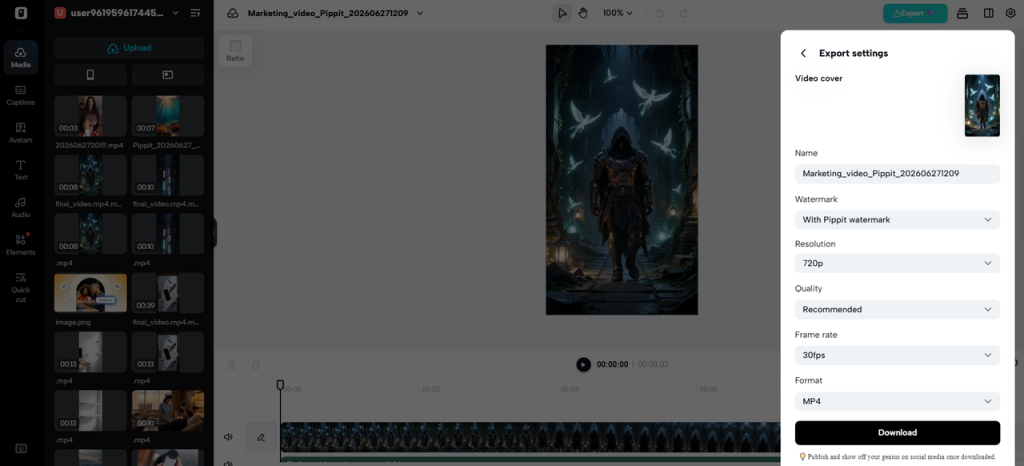
- To make changes, click “Edit more” and use the tools to crop, stabilize, adjust colors, or change the background.
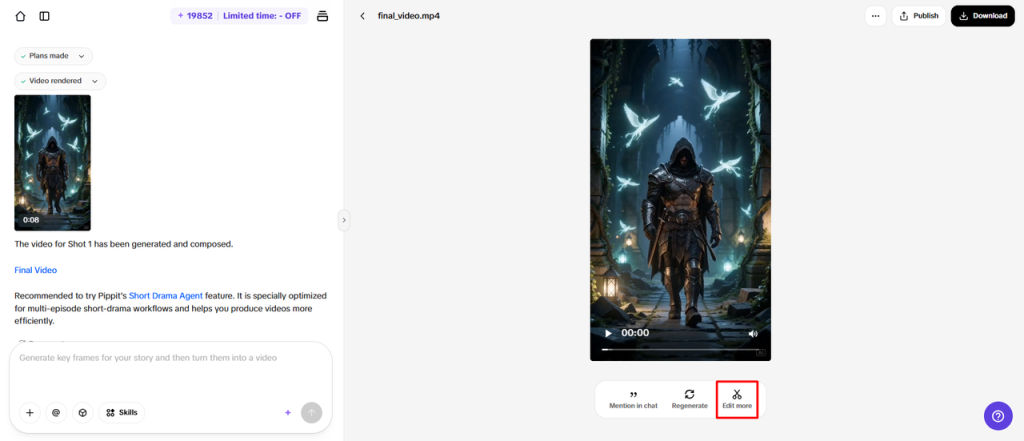
3. Or, click “Download” to save your AI-generated ad to your device, or “Publish” to share it directly on your social media.
Using Timestamp Prompts to Shape Better AI Advertisements
Timestamp prompts divide promotional videos into clearly defined, logical sections: beginning, middle, and end. Product reveals occur at the right time and get more in the spotlight of the audience at the right moments during the campaign. There is controlled camera movement to maximize the focus for key highlights, without any unnecessary movement. Structured scene timing improves the continuity of the narrative and avoids disjointed sequences of ads that reduce the viewers’ engagement. Natural CTA’s are strategically integrated into the scenes as they are set up in a creative way. This structured process can assist campaigns to better articulate the value of their products and enhance their visual storytelling.
Practical Ways to Improve AI Ad Quality
Strong advertisement quality depends on thoughtful planning before generation begins. Follow these practical practices for better results.
- Describe prompts of product, setting, lighting, atmosphere and camera movement.
- Avoid using general terms, as specific terms will help to ensure predictable visual results.
- Use images that are relevant to the campaign and use a single creative.
- Set up scenes in the proper order to allow smooth transitions and continuity in the story.
- Describe a realistic product interaction which allows for believable viewer interaction.
- Review each of the drafts that were created prior to exporting and address inconsistencies that may be apparent.
- Use multilingual prompting for localized campaigns, as per audience expectations.
Enhancing AI Advertisements with Reference Inputs
Reference inputs are more powerful in terms of visual direction – products, campaign colour, and overall creative identity are matched. Good photos of products ensure uniformity in the appearance of all the ads made. This will help in building brand credibility across the marketing mix and consistent branding. Meticulously selected references also improve the composition of scenes, guiding framing, positioning, and visual balance. With a single line of creativity, you can prevent having multiple looks to dilute promotion. With support for a wide range of reference formats, creators can create commercial visuals with consistency and confidence, while also improving their production efficiency.
Refining AI Advertisements After Generation
The editing process enhances the quality of the end result advertisement by making corrections to the visuals before it’s put on marketing communication platforms. Green screen editing is used to replace the standard background with lifestyle, branded or pro studio backgrounds. Lighting changes are useful to help standardize the lighting and balance the images for commercial use. Stabilization removes the distracting camera movements and makes for a smoother viewing experience in promo sequences. Multiple ads can be used to optimize ads to different campaign goals, preferences, and platform requirements. Optimized exports will ensure that videos play seamlessly on websites, social media, product pages, and digital advertising platforms, while maintaining a professional look.
Conclusion
Pippit provides a clear process for more creative guidance in the AI advertisement production process. Timestamps, visual cues, and cinematic movement and editing cues are consistent and add to each campaign. Planning helps with the more organized detailing and helps to avoid “scenes of no interest” and “drafting the script so many times.” Before publishing, careful refinement also enhances visual quality and the professionalism of the campaign. This can help them visualize the production process, developing polished ads that effectively communicate brand messages consistently and impactfully across different marketing channels.
WATCH TOP VIDEOS FROM NIGERIAN TRIBUNE TV
- Relationship Hangout: Public vs Private Proposals – Which Truly Wins in Love?
- “No” Is a Complete Sentence: Why You Should Stop Feeling Guilty
- Relationship Hangout: Friendship Talk 2025 – How to Be a Good Friend & Big Questions on Friendship
- Police Overpower Armed Robbers in Ibadan After Fierce Struggle