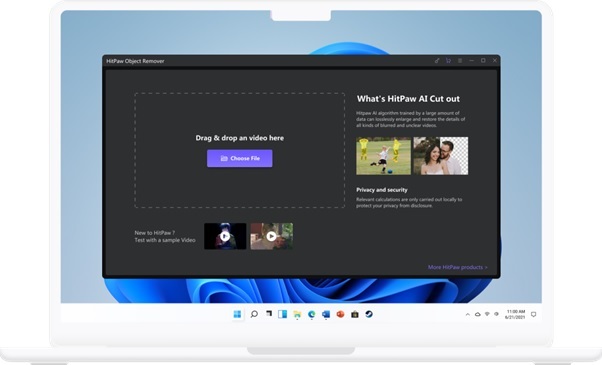
In our digital age, clean and precise videos are the norm. However, capturing that perfect shot can be spoiled by unexpected objects, people, or an imperfect background. There’s a solution that makes those issues disappear as if they were never there! And you can easily remove object from video.
Presenting the HitPaw Video Object Remover, an advanced AI-powered tool designed to help you remove unwanted elements from your video in just three simple steps. It is a tool with an intuitive interface that even beginners will find comfortable to use. With this tool, your quest for “how to remove object from video” ends!
In this blog, we will walk you through this tool and share some more information with you to enhance your experience which will you learn how to remove objects from video. With HitPaw Video Object Remover, the power to perfect your videos is in your hands. Let’s get started!
This high-end tool is equipped with key features that enable users to remove unwanted objects from video, making it an invaluable companion in video editing.
At the core of HitPaw Video Object Remover’s success is its advanced AI-powered technology. The artificial intelligence is designed to identify and lock object trajectories automatically, which, coupled with its spectacular inpainting abilities, ensures the unwanted elements are eliminated in a precise and seamless manner.
This AI-recognition feature not only simplifies object removal but also revolutionizes it, providing an impeccable outcome every time. With such technology, it becomes easy to remove object from video.
HitPaw Video Object Remover is not just technologically advanced but also user-friendly. Its simple and intuitive interface ensures a seamless experience.
Even beginners can use it quite easily. It guides users through a straightforward three-step process: choose the video, select the object, and remove it. This makes the process of improving your video as easy as 1-2-3, without requiring any technical expertise.
HitPaw Video Object Remover is a versatile tool with extensive application possibilities that heps you remove objects from video. It can be used to enhance any kind of video content, whether it’s a stunning landscape marred by an unwanted object, an e-commerce product video with an unsightly backdrop, or a personal video featuring someone you’d rather not include.
The software also excels at removing background clutter, leaving you with a clean, distraction-free video. It can easily remove objects from video. The capability to eliminate unwanted elements extends to people too. Users can remove individuals from video backgrounds, a feature that can be a lifesaver in a variety of personal and professional situations.
Have you ever recorded a fantastic video, only to later realize that there’s an unwanted object or person spoiling the otherwise perfect shot? Perhaps it’s an unknown person accidentally photo-bombing your video, or maybe it’s an unwanted object that’s drawing attention away from the main subject.
The good news is, with HitPaw Video Object Remover, you can easily remove these blemishes in just three easy steps. Here is how to remove object from video.
Before you can remove unwanted elements from your video, you first need to import the video into the HitPaw Video Object Remover. To do this, select the ‘Choose file’ option in the application. You can choose to browse for the video file on your computer or drag and drop the file into the HitPaw Video Object Remover, interface. It’s that simple. In no time, you’ll have your video loaded and ready for editing.
Next, select the ‘AI Remove Objects’ option. This will activate HitPaw Video Object Remover’s cutting-edge AI technology, designed to automatically track and identify unwanted objects or people within your video. Simply frame the unwanted object by drawing a box around it with your mouse.
You can fine-tune the selection area, and adjust the size of the box or the brush size to ensure the unwanted element is fully covered. Without sophisticated training in video-editing, you can do this step quite easily. Now that’s cool!
Once you have chosen the objects to be taken out then click on the ‘Remove’ button. You’ll be prompted to preview the clip. This will allow you to see the results before committing to the changes.
Now, if you like it then save it, if you don’t then redo it. At the end, just click on ‘Export’ to save the edited video on your computer. You’ll be amazed by how the unwanted objects vanish seamlessly as if they were never there in the first place. This is how you remove unwanted objects from video.
HitPaw Video Object Remover leverages advanced AI technology for object removal. It operates on the concept of “inpainting”, a technique where the AI model intelligently fills in the area of the object you want to remove with elements from the surrounding area.
This is achieved by analyzing the structure and pattern of the image around the area to be removed. Moreover, the AI technology in HitPaw Video Object Remover enables automatic tracking and identification of the object movement, ensuring a seamless and perfect removal. A simple method to remove unwanted objects from video!
Yes, HitPaw Video Object Remover is completely safe for removing unwanted objects from your videos. The tool respects user privacy and does not store or share your content. As a desktop application, all your edits are performed locally on your device, ensuring maximum privacy and security. Moreover, HitPaw Video Object Remover has a strong reputation among over 6 million users worldwide, emphasizing its trustworthiness.
HitPaw Video Object Remover is incredibly versatile and can be applied in a multitude of scenarios. The AI technology behind HitPaw Video Object Remover is capable of handling complex scenarios and different types of objects, which includes:
In conclusion, HitPaw Video Object Remover has proven itself to be a game-changer in the realm of video editing. Offering a combination of impressive AI-powered technology, a user-friendly interface, and intuitive controls, it allows users to remove unwanted objects from their videos seamlessly. Whether it’s a random person, an unwanted object, or even an ex-partner, HitPaw Video Object Remover helps you erase them as if they were never there, adding an unprecedented level of perfection to your videos.
Therefore, if you’re looking to transform your videos, remove unwanted elements, and achieve a clean, distraction-free result, HitPaw Video Object Remover is an excellent tool to consider. You’re just a download away from unlocking the power of professional video editing. So why wait? Download HitPaw Video Object Remover now, and get ready to perfect your videos with ease.
“The supermarket is no longer just a shop for millions of Nigerians, it is where…
Former Senator Ayo Arise has defended the economic reforms of President Bola Tinubu, urging Nigerians…
A Federal High Court sitting in Jos has affirmed Senator Simon Lalong as the nominated…
A grassroots development initiative aimed at bridging the gap between rural communities and the Federal…
•As Gbajabiamila meets him, Babangida The Chairman of National Peace Committee, General Abdulsalami Abubakar, has…
NIGERIA is targeting an increase in its strategic petroleum product reserves from the current 17…
This website uses cookies.